Knowledge is vast!

Yeah its true, knowledge is vast! It should be sought! Because the knowledge are always on progress through the works of creative innovations.

Here I will share about computers, sciences information and many more about what I want to share
I'll share it in two languages, Bahasa Indonesia and (sometimes) English.

So if you like this blog, please follow me or like my fan page.

Thanks.


Hey buddies, welcome here... Get knowledges and share it to your friends around the world, just click share button dude...
Showing posts with label make a website. Show all posts

Monday, August 22, 2011

[How To] Make an Own Website at NO COST! - Free of Charge (Part III)

In this third part I will show how to register a free domain dot.tk to you, at the same time connecting to a web hosting account.


 1. First, go to http://dot.tk and enter the domain name that you submitted in 000webhost earlier (or if already registered simply log only) as an example, here I register a domain Eleven-elephants.tk. simply by typing its domain name, eg here: Eleven-elephants. Then click "GO"


insert "domain name server details"

2. Then select the "Use DNS" and select tabs "Your own DNS". Enter a domain name server that is in 000webhost before.


You can get "domain name server" from your Account details on 000webhost


3. Complete all the forms that are required. Then register yourself. You can sign up through a Facebook account, Google, Windows Live ID, Yahoo, AOL or Flickr if you want. But if you do not want menguhubungkan one of the accounts mentioned above to dot.tk then choose "use your email address for signup".


4. Done. If there has already been notified that your domain has been created, then you just waiting for the two accounts are connected (domain dot.tk to 000webhost). Results if your site is ready to be used is like the next image:


Final words:
If you are planning to register a co.cc domain, then the steps are performed more or less the same. At essence in making a website is that we must have a domain and hosting then connect it. Then you upload the data needed webiste, for example main page or all pages to be published to the public. Then you have to do to make your webiste look attractive is to manage your website.


If you like this post, please leave your comment below to tell me that you're happy with these articles..
just share this post to your friends..


You can follow me on twitter @yusuf_udin to contact me :)


Thanks...


[How To] Make an Own Website at NO COST! - Free of Charge (Part II)


In this second article I will discuss how to sign up for a webhosting. Of course that is in use is webhosting free webhosting. 000webhost I use as examples in this article.Actually a lot of hosting services that provide free services, but I just chose 000webhsotas an example because I think 000webhost is very simple.


Previously, if you want to know what is web hosting you can visit the following address: http://en.wikipedia.org/wiki/Web_hosting
A web hosting service is a type of Internet hosting service that allows individuals and organizations to make their own website accessible via the World Wide Web. Web hosts are companies that provide space on a server they own or lease for use by their clients as well as providing Internet connectivity, typically in a data center. Web hosts can also provide data center space and connectivity to the Internet for servers they do not own to be located in their data center, called colocation or Housing as it is commonly called in Latin America or France..
The scope of web hosting services varies greatly. The most basic is web page and small-scale file hosting, where files can be uploaded via File Transfer Protocol (FTP) or a Web interface. The files are usually delivered to the Web "as is" or with little processing. Many Internet service providers (ISPs) offer this service free to their subscribers. People can also obtain Web page hosting from other, alternative service providers. Personal web site hosting is typically free, advertisement-sponsored, or inexpensive. Business web site hosting often has a higher expense.
Single page hosting is generally sufficient only for personal web pages. A complex site calls for a more comprehensive package that provides databasesupport and application development platforms (e.g. PHP, Java, Ruby on Rails, ColdFusion, and ASP.NET). These facilities allow the customers to write or install scripts for applications like forums and content management. For e-commerce, SSL is also highly recommended.
The host may also provide an interface or control panel for managing the Web server and installing scripts as well as other modules and service applications like e-mail. Some hosts specialize in certain software or services (e.g. e-commerce). They are commonly used by larger companies to outsource network infrastructure to a hosting company.


Well here are the steps in registering to 000webhost.com:


SignUp
    1. Register your website hosting here http://www.000webhost.com/order.php. If you do not already have your own domain (since you also are not signed up dot.tk) then please use with a subdomain provided by 000webhost (only for the first time only)


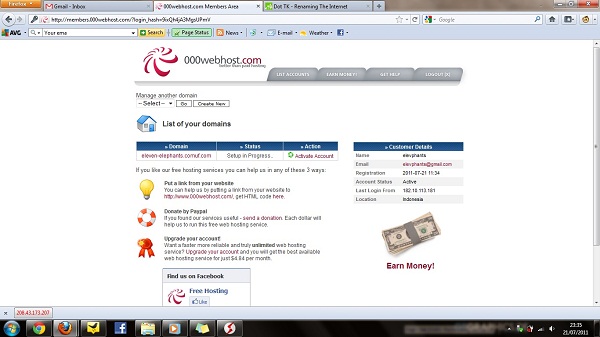
    2. After the first list, you need to confirm your email. Simply click on an account that was in the list then click the confirm email and check your email. completed. So on the second day you can register your domain name to these hosting. The following are the screenshots for step by step instructions to make it more clear:


    Progress notification. Click your Domain name to go to your account details (for the first time you need to confirm via email)


      Click Confirm my email button to confirm your email


      Now check your email and click the link that they're provide to you


      Now register your new domain to 000Webhost, enter the domain name (yourname.tk or yourname.co.cc) that you have registered then choose the password that you want to this account.

      Ok now you're success to register your domain name to 000webhost. The next steps you must to do is linking your domain to this account, so your data on this hosting is visible to public.

      Go to Cpanel and see "View Account Details"

      In there you can find your account details that you can use for manage your  website data (on this hosting).

      Ok, now you are successful have your hosting account. Then you have to immediately connect your domain to the hosting of this order can be accessed by the public. Two name servers and IP address will be given to you through the "account details". This data can be used to connect the domain that you register before the 000webhost. For example here I use a free domain dot.tk. So I need to do is to go to dot.tk to connect my account.


      If you like this post, please leave your comment below to tell me that you're happy with these articles..
      just share this post to your friends..


      You can follow me on twitter @yusuf_udin to contact me :)


      Thanks...

      [How To] Make an Own Website at NO COST! - Free of Charge (Part I)


      The development of the internet is quite fast, especially since the introduction of the WWW (World Wide Web) by Tim Berners-Lee in 1990. Well now I will share one partof much of the development of the Internet. That is create a website.

      For some people, web blog or often referred to as a blog alone is sufficient to accommodate the aspirations or their paper. But, if you want to have a customizable page, and editfreely throughout the paper and / or web pages that you have of course you want a website with a TOP LEVEL DOMAIN rather than blog with a subdomain.

      Here are the steps which I will describe to make a FREE website with a URL address yorname.tk and certainly with a a lot of free hosting offered by hosting providers overseas.

      1. Register your domain
          What is a domain? Domain is the name of your website. Each web page must have an address different from one another. Domains that we know as yourname.com oryourname.net and others such as the current is actually a measures to facilitate usersto access the server without having to remember series of numbers called Internet Protocol address. To find out more about what domain it please to the following address: http://en.wikipedia.org/wiki/Domain_name

      A domain name is an identification label that defines a realm of administrative autonomy, authority, or control in the Internet. Domain names are hostnames that identify Internet Protocol (IP) resources such asweb sites. Domain names are formed by the rules and procedures of the Domain Name System (DNS). 
      Domain names are used in various networking contexts and application-specific naming and addressing purposes. They are organized in subordinate levels (subdomains) of the DNS root domain, which is nameless. The first-level set of domain names are the top-level domains (TLDs), including the generic top-level domains (gTLDs), such as the prominent domains com, net and org, and the country code top-level domains (ccTLDs). Below these top-level domains in the DNS hierarchy are the second-level and third-level domain names that are typically open for reservation by end-users that wish to connect local area networks to the Internet, create other publicly accessible Internet resources or run web sites. The registration of these domain names is usually administered by domain name registrars who sell their services to the public.

      Individual Internet host computers use domain names as host identifiers, or hostnames.
       Hostnames are the leaf labels in the domain name system usually without further subordinate domain name space. Hostnames appear as a component in Uniform Resource Locators (URLs) for Internet resources such as web sites(e.g., en.wikipedia.org).
       Domain names are also used as simple identification labels to indicate ownership or control of a resource. Such examples are the realm identifiers used in the Session Initiation Protocol (SIP), the DomainKeys used to verify DNS domains in e-mail systems, and in many other Uniform Resource Identifiers(URIs). 
      An important purpose of domain names is to provide easily recognizable and memorizable names to numerically addressed Internet resources. This abstraction allows any resource (e.g., website) to be moved to a different physical location in the address topology of the network, globally or locally in an intranet. Such a move usually requires changing the IP address of a resource and the corresponding translation of this IP address to and from its domain name.

      Domain names are often referred to simply as domains and domain name registrants are frequently referred to as domain owners, although domain name registration with a registrar does not confer any legal ownership of the domain name, only an exclusive right of use.
      The Internet Corporation for Assigned Names and Numbers (ICANN) manages the top-level development and architecture of the Internet domain name space. It authorizes domain name registrars, through which domain names may be registered and reassigned. The use of domain names in commerce may subject strings in them to trademark law. In 2010, the number of active domains reached 196 million.[1]

      There are two options for the free domain you can get, that is:

      1. dot.tk
       dot.tk is a free domain name service that can be used freely with a hosting you want. Registration for each domain valid for a maximum of one year and you can extend for another one next year.

      2. co.cc

      co.cc is quite popular and has a name that can be said to be equal with the .com domain. However, a co.cc domain that can be obtained free of charge to home users. If youwant to use it as a domain for business, then you should buy it.

      For the procedure of registering a domain, I will discuss in the third article, before registering domain i will show you how to sign up to the free webhost.


      If you like this post,
      please leave your comment below to
      tell me that you're happy with these articles
      just share this post to your friends...


      You can follow me on twitter @yusuf_udin to contact me :)


      Thanks...


      Twitter Delicious Facebook Digg Stumbleupon Favorites More

       
      Get widget