Knowledge is vast!

Yeah its true, knowledge is vast! It should be sought! Because the knowledge are always on progress through the works of creative innovations.

Here I will share about computers, sciences information and many more about what I want to share
I'll share it in two languages, Bahasa Indonesia and (sometimes) English.

So if you like this blog, please follow me or like my fan page.

Thanks.


Hey buddies, welcome here... Get knowledges and share it to your friends around the world, just click share button dude...

Sunday, August 28, 2011

Fitur Baru Facebook: "Ticker" Memudahkan Kamu Melihat Aktivitas Terbaru Teman

Meskipun tampaknya belum ada press release dari facebook mengenai fitur baru yang terpajang di halaman muka faceook saya, namun saya berani menyimpulkan ini adalah fitur baru. Di namai "Ticker", side bar baru ini memberikan informasi tentang aktivitas terbaru yang teman kita lakukan. Seperti apa yang teman sukai, dimana dan apa yang teman komentari atau status terbaru teman akan muncul dalam side bar yang dinamakan "TIcker" oleh facebook.

Ketika anda scroll down, maka ticker akan tetap mengikuti anda sehingga anda bisa fokus pada apa yang teman lakukan saat ini.

Tak ada keterangan lebih lanjut yang saya dapatkan, bahkan official account facebook juga belum mengeluarkan keterangannya. Tapi sebagai sedikit bocoran, ketika anda mengarahkan kursor anda ke "Ticker" ini, maka akan ada keterangan tambahan dimana aktivitas tersebut berada.

Dan berikut ini adalah hasil screenshot yang saya dapatkan


Meski bukan peruahan besar, tapi facebook tahu ini akan memudahkan pengguna untuk memantau aktivitas temannya pada saat itu juga.

[UPDATE]

semenjak beberapa menit yang lalu, saya kehilangan fitur ini. Tak ada keterangan yang jelas tetapi tiba-tiba fitur ticker ini menghilang dari akun facebook saya. Memang, saya kehilangan fitur ini pada hari yang lain, (saya menulis posting ini pada jam-jam terkahir hari minggu, agustus, 28 20011 da kehilangan fitur ini pada sekitar jam 1:20 am senin, agustus 29, 2011). Saya rasa ini karena facebook masih menguji coba fitur ini dan belum meresmikannya untuk publik meskipun dalam versi beta.

Jadi, tunggu saja hingga facebook mengeluarkan press release lewat akun resminya.

New Feature on Facebook: Ticker, Let You See the Highlights of Friends Activities

Although it seems there is no press release from facebook about the new features displayed on the front page of my facebook, but I dare to conclude this is a new feature. In the name the "Ticker", a new side bar provides information about the latest activities of our friends are doing. Like what your friends like, where and what your friends or comment on the latest status of your friends will appear in the side bar called "ticker" by facebook. When you scroll down, then the ticker will continue to follow so you can focus on what your friends are doing today.

No further information I get, even official facebook account has not issued a statement. But as a little leak, when you point your cursor to the "Ticker", then there will be additional information which the activity is located.

And the following screenshot of the results that I get:
Ticker Side bar

Although this change does not affect the overall features faceook so, but I think this is one thing that facebook erikan to ease its users to communicate with each other.


[UPDATED 1:39AM (GMT +7) Monday, August 29, 2011]

since few minutes ago, I lost this feature. There was no clear explanation but suddenly this ticker feature disappeared from my facebook account. Indeed, I miss this feature on another day, (I wrote this post during the hours of last Sunday, August 28, 20 011 da miss this feature at about 1:20 am Monday, August 29, 2011). I think this is because Facebook is still testing this feature and yet it official for the public even in beta.

So, just wait until the facebook issue a press release through his official account.

Thursday, August 25, 2011

Membuat 'saving energy' pada Blog atau Website

:hmm: seperti yang kita tau energi kini sudah merupakan barang yang harus benar-benar dijaga.. Para ilmuwan  pun sekarang sudah mulai mencari energi terbarukan. Ya! memang merupakan fakta tak terbantahkan jika energi dunia semakin krisis. Disamping itu dari segi teknologi, para pembuat gadget pun juga mulai mencari solusi untuk membuat gadget yang low-energy. Misal dalam komputer, penggunaan komputer dan laptop yang semakin hari semakin tak terkonkrol saja :hammer juga ikut menghabiskan banyak sumber energi.

Dan kita tahu bahwa dengan membuang-buang energi (termasuk listrik) ikut berperan andil dalam percepatan GLOBAL WARMING :mewek

UNTUK ITU AYO KITA BERHEMAT-HEMAT ENERGI
UNTUK MASA DEPAN ANAK CUCU KITA YANG LEBIH BAIK!

Kalau kita punya blog, kita bisa membuat blog kita lebih ramah energi. Yaitu dengan menampilkan halaman berwarna hitam ketika seseorang pengunjung meninggalkan blog kita dalam waktu satu menit. Jadi inilah intinya, kita tahu layar yang berwarna hitam sama dengan tidak memerlukan energi! :toast .

Andai semua web seperti ini, mungkin akan lebih efektif ya.... :cool

Sekarang gimana caranya?
Nah dengan script dari http://www.onlineleaf.com/ berikut kamu bisa membuat blog kamu menampilkan halaman kosong jika pengunjung mendiamkannya selama 1 menit.

Caranya:
Untuk blogger:
masuk ke "Rancangan" atau jika menggunakan bahasa inggris namanya "Design". Pilih "Edit HTML"
lalu cari kode <head>  menggunakan fasilitas CTRL+F dan ketikkan kode berikut dibawah kode <head> tersebut:

<script language="javascript" type="text/javascript" src="http://www.onlineleaf.com/savetheenvironment.js"></script>

Setelah itu klik save.

Untuk wordpress, bisa mendownload plugin dari sini.

Karena script ini menggunakan jQuery, maka jika kamu menggunakan javaScript libraries yang lain, tambahkan script 

<script>jQuery.noConflict();</script>

agar tidak terjadi error.

Testing dulu gan.. emot kaskus di blog ane HaHa

cuman ngetest dulu gan...
emot kaskus di blog ane,, hasilnya begini gan.. mehehe

:cd :2thumbup :ngacir :ngacir2 :mewek :cendolbig :batabig :kiss :najis :marah :repost :selamat :hammer :toast :repost :iloveindonesia :peluk

:ilovekaskus gan! hahahaha

:ngakak

:sup: :sup2:
:malu

sebenernya masih ada lagi gan tapi ane gak apal kodenya..hahahahah :ngakak lagi gan :cool

klo pengen kayak gini,, mentions ane aja via twitter :thumbup

Tuesday, August 23, 2011

Getting Missing Data

Have you ever accidentally lose data? And it is Important Data? If so, maybe when we lose these data you will feel angry and annoyed. Do you know if the data is actually what you get back to you shortly after you remove it from the recycle bin even though you have turned off the computer and then back on again.

Recuva Logo
With a software called Recuva, you can restore the lost data or in another sense you will get your old data. Of course all this is not unconditional, you must understand that before you do this trick, you get the data you want is not that long ago deleted. You should also know that you have never done the 'drive wiper' after deleting the dat. And remember also that you do not remove the data by cleaning software such as CCleaner or through a secure data deletion process.

Well, back to the topic of discussion, Recuva is free software made ​​by Piriform (CCleaner, which also produces software). Although free, but Recuva has a feature that is qualified. With Recuva you can mengembailkan dat is erased during the data is not overwritten by other data. Even data that has been long removed any terkadan can be recalled in the search results to data Recuva yag deleted. And to prove it, you can download directly from its official website Recuva in http://www.piriform.com/recuva/download or directly from here:


[Health] avverhoa bilimbi (belimbing wuluh): a Powerful Acne Busters

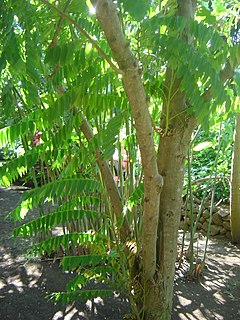
blimbing wuluh fruits
The taste is sour and unpleasant create plants that have a scientific name avverhoa bilimbi become very rarely used or just a considered. Plants in Indonesia known as the 'belimbing wuluh' is actually has some good properties.


blimbing wuluh tree
Quoted by blog writers from suaramedia.com, starfruit are included into the Kingdom: Plantae Division: Magnoliophyta, Class: Magnoliopsida, Order: Oxalidales, Family: Oxalidaceae, Genus: Averrhoa, and Species: A. bilimbi This has several benefits:


a. Bleeding gums
Regular consumption of fresh starfruit or it could have made ​​sweets

b. pimple
For external treatment. Wash 3 starfruit, fresh, shredded and give a little salt. Paste had grated on the skin with acne. Perform 2 times daily.

Or you can also:
Prepare the fruit starfruit and 6 1 / 2 teaspoon finely ground sulfur powder.
Mix and squeeze, then add 2 tablespoons lime juice.
Rub on acne afflicted areas.
Do it 2-3 times a day.

c. High Blood
Prepare 3 pieces starfruit
Sriganding 25 grams of seeds, wash and then mash until smooth
Cook 4 cups of water, add the starfruit and seeds sriganding.
Cool, then strain the herb
Drink one glass a day

Starfruit commonly used as a spice for cooking, is also often used as a medication for high blood or cough medicine. But many do not know the other properties of medicinal plants on this one, namely to treat toothache, rheumatism and intestinal ulcers.

Monday, August 22, 2011

[How To] Make an Own Website at NO COST! - Free of Charge (Part III)

In this third part I will show how to register a free domain dot.tk to you, at the same time connecting to a web hosting account.


 1. First, go to http://dot.tk and enter the domain name that you submitted in 000webhost earlier (or if already registered simply log only) as an example, here I register a domain Eleven-elephants.tk. simply by typing its domain name, eg here: Eleven-elephants. Then click "GO"


insert "domain name server details"

2. Then select the "Use DNS" and select tabs "Your own DNS". Enter a domain name server that is in 000webhost before.


You can get "domain name server" from your Account details on 000webhost


3. Complete all the forms that are required. Then register yourself. You can sign up through a Facebook account, Google, Windows Live ID, Yahoo, AOL or Flickr if you want. But if you do not want menguhubungkan one of the accounts mentioned above to dot.tk then choose "use your email address for signup".


4. Done. If there has already been notified that your domain has been created, then you just waiting for the two accounts are connected (domain dot.tk to 000webhost). Results if your site is ready to be used is like the next image:


Final words:
If you are planning to register a co.cc domain, then the steps are performed more or less the same. At essence in making a website is that we must have a domain and hosting then connect it. Then you upload the data needed webiste, for example main page or all pages to be published to the public. Then you have to do to make your webiste look attractive is to manage your website.


If you like this post, please leave your comment below to tell me that you're happy with these articles..
just share this post to your friends..


You can follow me on twitter @yusuf_udin to contact me :)


Thanks...


Twitter Delicious Facebook Digg Stumbleupon Favorites More

 
Get widget